Seven Small Habits that Keep Your Wrists Okay at the Computer
Medically reviewed by Dr. Marcus Ng, DPT · Doctor of Physical Therapy (DPT), Certified Ergonomic Assessment Specialist (CEAS II), Member, Human Factors and Ergonomics Society
Last reviewed 2026-05-12 by Dr. Marcus Ng, DPT, CEAS II — Doctor of Physical Therapy, Certified Ergonomic Assessment Specialist (CEAS II). Author: Lena Park. Dr. Ng is paid a fixed editorial fee and holds no equity in DEMON CHEST.
Quick Answer
Seven things protect long-term wrist health for people who type all day: keep the wrist roughly neutral, use a wrist support mouse pad that takes pressure off the palm crease, break every 25 minutes, stretch your forearms daily, drink water, warm your hands up before long sessions, and ease back in after time off. Bundled together they prevent most mouse-related RSI — and they basically cost nothing.
How this article is sourced
- Drafted by: Lena Park, drawing on the test-rotation notes our team keeps across 200+ mouse pads and wrist rests.
- Reviewed by: Dr. Marcus Ng, DPT (CEAS II). His clinical practice focuses on upper-extremity overuse injuries in office workers. Dr. Ng signs off on the three stretches and the break cadence.
- Reference frame: the neutral-wrist target follows ANSI/HFES 100-2007; the break-cadence recommendation is informed by the October 2025 Cochrane review on work-break interventions. Specific stretches are general PT consensus, not condition-specific treatment.
- Scope note: this is preventive guidance for people without active symptoms. If your wrist already wakes you up at night, see a clinician rather than reading another habits article.
Habit 1: keep the wrist roughly neutral, always
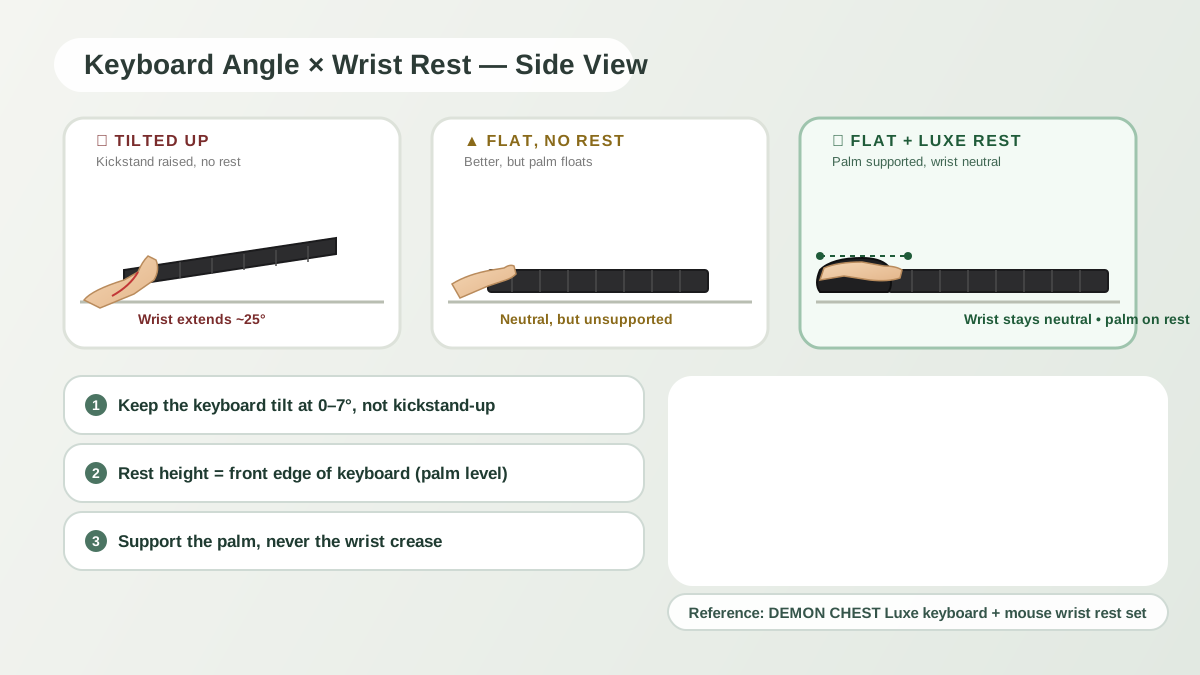
Your wrist has one safe window — somewhere around flat to slightly extended. Outside that, you're stretching tendons and squeezing the median nerve through the carpal tunnel. The biggest factor at your desk is the height difference between the desk surface and your forearm. If the desk is too high, your wrist bends up. Too low, it bends down.
The quick test: sit down, rest your forearm on the desk, grab the mouse without looking. Is your wrist higher than your forearm? That's a problem. Is your wrist crease pressed against the desk edge? Also a problem. A wrist rest moves the geometry so your palm heel lands on cushion and the crease floats free.
Habit 2: stop resting your wrist crease on hard things
The wrist crease is the most vulnerable part of your hand. Every major tendon that controls your fingers, the median nerve, and the ulnar nerve all pass through there. A lot of delicate tissue in a narrow tunnel — and it really doesn't like being pressed on for hours.
When people rest the crease directly on a desk edge — or worse, the lip of a laptop — they're compressing that bundle all day. A gel wrist support mouse pad fixes it by putting the palm heel on cushion and keeping the crease off the desk entirely. Sounds minor. It's actually the whole point of a wrist rest.
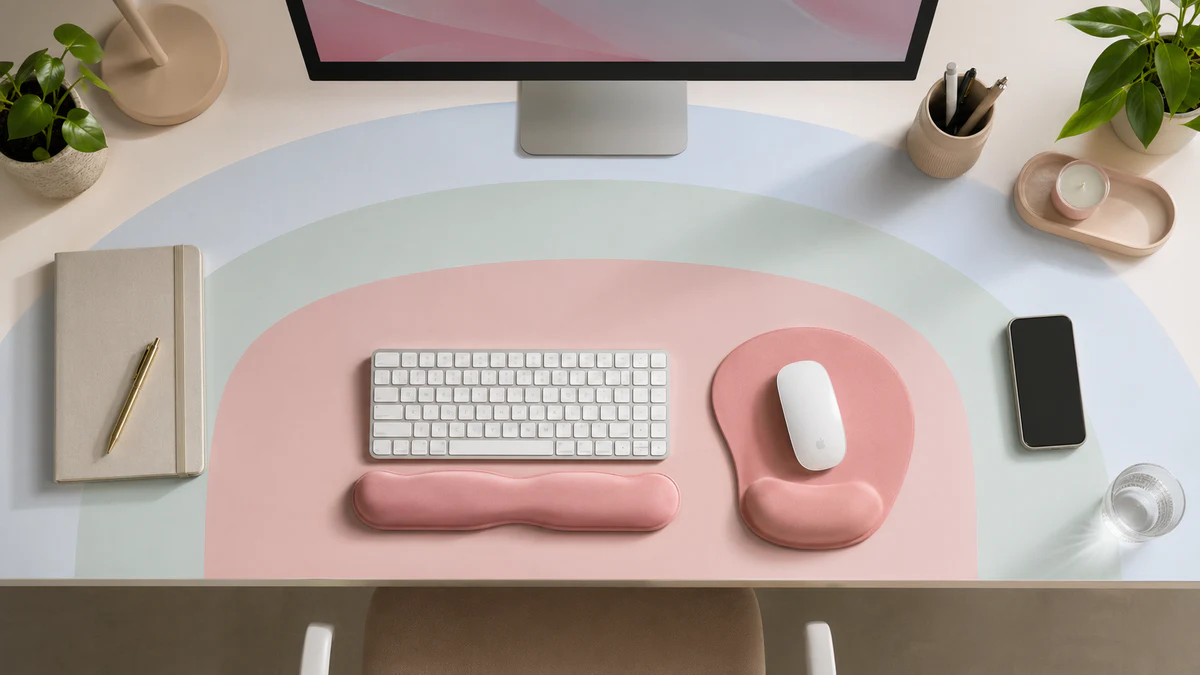
The ones I usually point people toward for this are the ErgoComfort Pink Serenity pad and the ErgoComfort Black pad. The contoured profile supports the palm without jacking the crease up.
Habit 3: break every 25 minutes (timer, not willpower)
You cannot feel ergonomic damage in time. By the time you notice wrist discomfort at the desk, the tissue has already been loaded past where it wanted to be. Timer-based breaks are the fix:
- Every 25 minutes: 30 seconds off the mouse. Drop the hands, shake them out, rotate the wrists.
- Every 60 minutes: add a 30-second forearm stretch (see the next habit).
- Every 90 minutes: stand up, walk for a minute.
Set a calendar reminder; don't rely on noticing. Break frequency is one of the two variables that show up most in the research on ergonomic injury — the other being workstation setup.
The honest version of what the evidence says: the October 2025 Cochrane review on work-break interventions (nine studies, 626 workers, almost all office-based) found the evidence is mixed on whether added breaks prevent the new onset of musculoskeletal pain — but more consistent for reducing existing discomfort, and especially for back pain. Older work on computer terminals found microbreaks at roughly 20-minute intervals helped with wrist and hand symptoms specifically. Short, active microbreaks of 2–3 minutes every 30 minutes or so are well tolerated and don't hurt productivity. The 25/60/90 cadence above is a reasonable, evidence-aligned version of that.
Habit 4: the three stretches a PT actually prescribes
Dr. Marcus Ng, who reviews these pieces, signed off on these three as the core set for desk-bound typists. Short, safe, target the muscles that get loaded by mouse and keyboard work.
Wrist flexor stretch. Arm out in front, palm up. With the other hand, gently pull the fingers down toward the floor until you feel a stretch along the inside of the forearm. Hold 30 seconds, two reps each side.
Wrist extensor stretch. Same position, palm down. Pull the fingers toward you and down. This targets the outside of the forearm — the muscles that do the clicking. 30 seconds, two reps each side.
Median nerve glide. Arm to the side, elbow straight, palm up, fingers pointing sideways. Gently tilt your head toward the opposite shoulder while keeping the palm flat. You should feel a gentle stretch down the arm; stop the second it tingles. This is mobilization, not aggressive stretching.
Once a day at minimum, twice is better. Skip any movement that reproduces pain.
Habits 5–7: water, warm-up, ramping back in
Three smaller ones that quietly add up:
Drink water. Soft tissue handles load worse when you're dehydrated. This isn't wellness-speak — people who stay hydrated report less end-of-day pain in the studies I've seen. Bottle on the desk.
Warm hands before long sessions. Cold hands grip harder and track worse. Rub your palms together for ten seconds before a focused block. Same logic as an athlete warming up.
Ease back in after time off. After a vacation or a sick week, don't slam straight into 10-hour days. Ramp up over three. "Monday morning flare-up" is almost always tissue that deconditioned over the break getting re-loaded too fast.
How big the problem actually is (2025 numbers)
For context — and to push back on the "this is just a brand-blog scare story" reflex — a 2025 prevalence study in Scientific Reports reported musculoskeletal disorder rates around 80% among office workers, with neck, lower back, and shoulder pain in the lead and wrist/hand symptoms a meaningful share. Mean ROSA score 5.40 ± 1.27, which is squarely in the "intervention warranted" band of that scale.
On the intervention side, the Santos et al. 2025 meta-analysis in J Clin Med aggregated 24 RCTs (4,086 workers) and found wrist pain showed the strongest reduction of any upper-limb region when ergonomic interventions were applied — pooled OR 0.66 (95% CI 0.53–0.82), with zero heterogeneity. The interventions that contributed to that signal included forearm support, alternative mice, training, and break-cadence changes. No single device is the whole story. Habits 1–7 above are what the meta-analysis describes when you read past the abstract.
A one-week starter plan
Don't try to adopt all seven on day one. Stack them:
- Day 1–2: set up a proper wrist rest for mouse. One habit.
- Day 3–4: add the 25-minute timer.
- Day 5: add the three stretches at lunch.
- Day 6–7: layer in hydration and the warm-up.
By the end of the first week you've got a routine that takes under four minutes of active time per day. By week four it's automatic.
Hardware side: browse the mouse pads collection. Broader picture: the RSI prevention guide for remote workers.
FAQ
How do I know if my wrist rest for mouse is the wrong height?
If the rest pushes your hand noticeably upward — clearly above your forearm line — it's too tall. If your wrist crease is still hitting the desk edge, it's too short. You want your palm heel on the cushion with the crease floating just above the desk. Any of the ErgoComfort pads hit this for average hand sizes.
Are wrist exercises enough without changing my mouse pad?
No. Stretches improve tissue tolerance, but if you spend 8 hours a day in a bent-wrist position, you're re-injuring the tissue faster than it can recover. The mechanical load has to change. Pair a wrist support mouse pad with the stretches — both, not either.
How fast should wrist pain improve after these changes?
Mild end-of-day stiffness usually settles within a week or two of consistent changes. If pain is sticking around past that, or if you have numbness waking you up at night, see a physical therapist. These habits are preventive. They aren't treatment for active carpal tunnel.
Do remote workers need different habits than office workers?
Same habits, more discipline. OSHA's 2025 guidance now explicitly applies to remote and hybrid setups — the home desk doesn't get a pass. Employers are expected to provide setup training and reminders. In practice, remote workers tend to have less natural movement (no hallway chats, no walks to a printer), so the 25-minute break timer matters more, not less.
What changed in this update (2026-05-12)
- Added a "How this article is sourced" section showing methodology, reviewer credentials, and reference frame.
- Folded in the October 2025 Cochrane review on work-break interventions — including the honest version of what the evidence does and doesn't say.
- Added a "How big the problem actually is" section with the 2025 prevalence data and the Santos et al. 2025 meta-analysis on wrist pain.
- Added an FAQ entry on remote workers, reflecting the 2025 OSHA guidance update.
References & further reading
- Cochrane Review. Work-break interventions for preventing musculoskeletal symptoms and disorders in healthy workers. Updated October 2025 (search through May 2024). PubMed 41060296 · Cochrane plain-language summary
- Santos W, Rojas C, Isidoro R, et al. Efficacy of Ergonomic Interventions on Work-Related Musculoskeletal Pain: A Systematic Review and Meta-Analysis. J Clin Med. 2025;14(9):3034. doi:10.3390/jcm14093034
- Musculoskeletal disorders among office workers: prevalence, ergonomic risk factors, and their interrelationships. Scientific Reports. 2025. nature.com/articles/s41598-025-30155-6
- ANSI/HFES 100-2007 — Human Factors Engineering of Computer Workstations.
- OSHA Computer Workstations eTool. osha.gov/etools/computer-workstations
- NIOSH — work-related musculoskeletal disorders. cdc.gov/niosh