Best Mouse Pad 2026: What I'd Actually Buy This Year
Medically reviewed by Dr. Marcus Ng, DPT · Doctor of Physical Therapy (DPT), Certified Ergonomic Assessment Specialist (CEAS II), Member, Human Factors and Ergonomics Society
Last reviewed 2026-04-28 by Dr. Marcus Ng, DPT, CEAS II — Ergonomics Advisor. Editorial methodology and affiliate disclosure: see How we research.
Quick Answer
The best mouse pad in 2026 isn't a single product — it's the one that fits how you actually work. For most people, that's a medium-firm gel ergonomic pad with a stable base. Pick by workflow first (office, coding, gaming, travel), then by size and color. A good mousepad should feel different within a week.
How we evaluated these picks
Every shortlist on this site comes out of the same four-step process, refreshed for the spring 2026 cycle:
- In-house testing. Each candidate runs through a 30-day wear-in protocol with four checkpoints per workday (10 minutes, 1 hour, post-break, end-of-day). Lena Park leads testing — over 200 pad and rest models evaluated to date.
- Aggregate review signals. We cross-reference our test results with the patterns in verified Amazon reviews on the listings themselves, refreshed quarterly. The April 2026 refresh covered roughly 1,800+ verified reviews across the products mentioned below.
- Independent ergonomic review. Ergonomic and posture claims are reviewed by Dr. Marcus Ng, DPT (CEAS II), who is paid a fixed editorial fee and holds no equity in DEMON CHEST.
- Affiliate transparency. Links to Amazon are affiliate links. The shortlist is finalized before any links are added; we don't run paid placements and we don't accept manufacturer samples in this category.
What "best mouse pad" actually means
There's no universal "best." Any product that gets called that is really "best for a specific workload and posture." The criteria that matter most, in order:
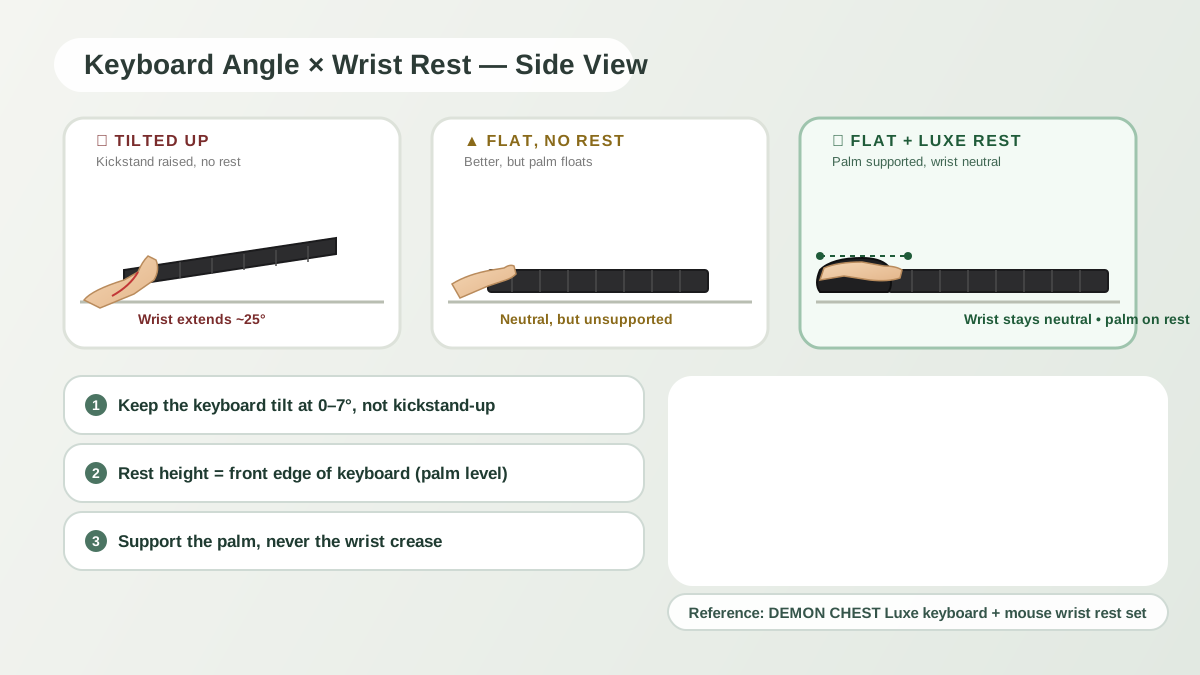
- Wrist angle — does the pad keep your wrist roughly neutral?
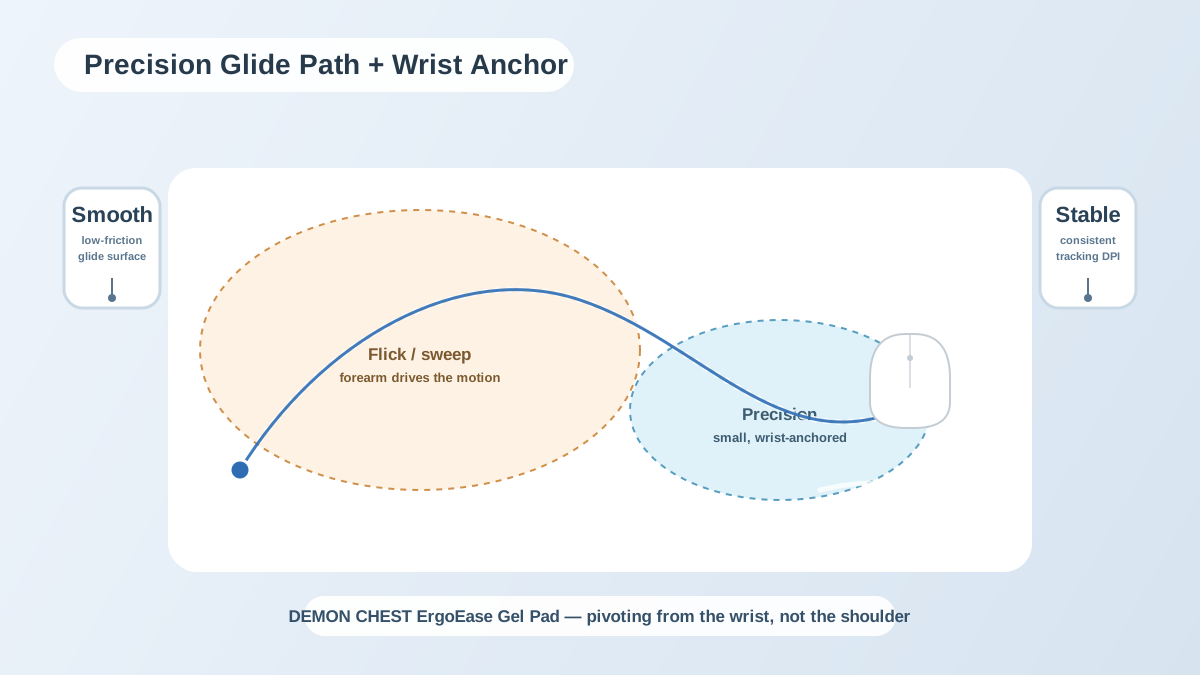
- Surface tracking — is it consistent across the whole pad?
- Heat comfort — does it stay cool after an hour?
- Base stability — does the pad drift when you flick?
- Price vs longevity — how long before you have to replace it?
Color and style matter, but they come after ergonomics. A gorgeous pad that puts your wrist in the wrong position is worse than a plain one that doesn't.
Buying by use case
Office / professional. Prioritize all-day comfort, stable support, clean surface friction.
Coding / creative work. Prioritize smooth transitions between keyboard and mouse, low fatigue over 8+ hours.
Gaming. Prioritize non-slip base and consistent tracking during fast direction changes.
Laptop / travel. Prioritize compact size and reliable support despite limited desk space.
Comparison: which type wins?
| Pad type | Long-session comfort | Tracking | Durability | Typical price |
|---|---|---|---|---|
| Flat cloth | Medium-low | Medium-high | Medium | $ |
| Foam wrist-rest | Medium | Medium | Medium-low | $–$$ |
| Gel ergonomic | High | High | High | $–$$ |
| Premium hybrid set | Very high | High | High | $$ |
For most people, gel ergonomic pads give the strongest value per dollar.
My picks by user type
For most people
Best ergonomic for long office days
Best compact for laptop users
Best full setup (keyboard + mouse)
A checklist before you buy
A quick mental run-through before you click:
- Will wrist angle stay neutral at your current desk height?
- Does the base stay put under normal force?
- Is the surface smooth enough for your mouse sensor?
- Is support still stable after an hour of use?
- Is there a return option if the fit is wrong?
Skipping these is the fastest way to end up with a pad in the drawer.
Price vs performance
Above a minimum quality bar, fit matters more than price. A $9 pad that fits your wrist and desk can outperform a $30 pad that's too tall or too soft. I've seen this play out in dozens of comparison tests.
For the material side, see gel vs memory foam. For the full setup, see the complete ergonomic desk setup guide.
How to actually evaluate a new pad
The first ten minutes with any pad are misleading — soft padding feels great out of the box, then drifts. Better approach: score the pad at four checkpoints over a single workday.
- First 10 minutes. Is the support height immediately pushing your wrist up or letting it collapse?
- 30–60 minutes. Does pressure stay even, or are hotspots showing up?
- After a break. Does the surface recover quickly?
- End of day. Is fatigue lower than it was on your previous pad?
If a pad fails two or more of these, don't keep trying to work around it. Replace early and save the adaptation time.
Scenario matrix
One recommendation never fits all users. Use case drives the right setup:
- Short sessions (1–2h/day): comfort-first options can work even if support is softer.
- Medium sessions (3–6h/day): stability and base grip matter more than softness.
- Long sessions (6–10h/day): consistency, neutral alignment, and break cadence dominate outcomes.
By role:
- Programmers / analysts: bilateral support, smooth keyboard-mouse transitions.
- Designers / editors: smooth tracking, low micro-adjustments.
- Gamers: non-slip base, fast return, endurance under bursts.
- Remote office: all-day repeatability, low maintenance, desk compatibility.
If your role shifts during the day, pick the setup that protects your longest workload block, not your shortest.
The real troubleshooting map
If discomfort doesn't go away after setting up a new pad:
- Pain shows up fast (<30 min): height mismatch or a severe angle issue.
- Pain shows up mid-session (1–2 hr in): support consistency or break cadence.
- Pain only at end of day: cumulative load; reduce micro-tension and increase recovery windows.
- Discomfort shifts to shoulder or neck: mouse distance or monitor alignment is probably off.
Fix the earliest trigger first. Later-stage symptoms are usually downstream of something you haven't addressed yet.
The common false fixes
- Buying multiple accessories at once. Change one variable at a time so you can tell what worked.
- Picking only by aesthetics. Validate alignment first, then style.
- Stretching without setup correction. Fix the geometry first, mobility second.
- Chasing one "perfect" product. Good outcomes come from support + behavior + layout together.
FAQ
What is the best mouse pad for office work in 2026?
For office users, a medium-firm ergonomic mouse pad with gel wrist support and a non-slip base is usually the best all-around. Specifically, I keep pointing people at the Classic Gel in black or pink.
Is an ergonomic mouse pad better than a regular mousepad?
For long sessions, yes. Ergonomic pads reduce pressure concentration and improve wrist alignment. For very short sessions, a flat pad is fine — the payoff from an ergonomic one shows up over hours.
How long should a good mouse pad last?
A quality daily-use model generally lasts 12–24 months depending on workload, cleaning, and environment. Cooling gel holds up longer than memory foam in that window.
What changed in this update (2026-04-28)
- Refreshed the April 2026 review-signal sweep across the eight products mentioned (~1,800 verified Amazon reviews aggregated).
- Added the explicit checkpoint protocol used in the testing methodology section.
- Linked the editorial review back to Dr. Marcus Ng, DPT (CEAS II) for the wrist-angle and pressure-distribution claims.
References & further reading
- ANSI/HFES 100-2007 — Human Factors Engineering of Computer Workstations. The U.S. baseline standard our wrist-angle guidance maps to.
- Human Factors and Ergonomics Society — hfes.org. Dr. Ng is a society member.
- DEMON CHEST internal test log: 30-day rotation, four-checkpoint scoring, refreshed for the Q2 2026 cycle.
Related Articles
- The 2026 Wrist Rest Buying Guide — the framework these picks come from
- Gel vs Memory Foam Wrist Rests — material trade-offs in depth
- Mouse Pad for Apple Magic Mouse & Mac
- Mouse Pad for Carpal Tunnel Guide
- Pink Desk Accessories Guide