The Ergonomic Desk Setup Guide I Wish I'd Had Five Years Ago
Medically reviewed by Dr. Marcus Ng, DPT · Doctor of Physical Therapy (DPT), Certified Ergonomic Assessment Specialist (CEAS II), Member, Human Factors and Ergonomics Society
Last reviewed 2026-04-28 by Dr. Marcus Ng, DPT, CEAS II — Ergonomics Advisor, Member of the Human Factors and Ergonomics Society. The four posture measurements below align with ANSI/HFES 100-2007 and OSHA's Computer Workstations eTool. Educational only — not a substitute for an in-person assessment if you have active symptoms.
Quick Answer
A workable ergonomic desk setup comes down to four measurements: monitor top at eye level, elbows slightly open (95–100°), feet flat on the floor, wrist roughly neutral. Add four accessories in this order: a chair that fits you, a monitor riser, an ergonomic mouse pad with wrist rest, and a keyboard wrist rest. You can do the minimum for around $0–$50, or overhaul the whole thing for a few hundred. The single cheapest upgrade with the biggest day-to-day impact is a gel mouse pad with wrist support for under $15.
How this guide is built
- Author: Lena Park, Lead Product Researcher, who has tested 200+ ergonomic accessory models on a 30-day wear-in protocol.
- Reviewer: Dr. Marcus Ng, DPT, CEAS II — paid a fixed editorial fee, no equity in DEMON CHEST. He flags any guidance that drifts away from accepted ergonomic standards before publication.
- Sources of truth. Posture and angle targets in this guide are calibrated against ANSI/HFES 100-2007 (the U.S. workstation standard) and OSHA's Computer Workstations eTool. Where popular advice and the standards disagree, we follow the standards.
- Affiliate disclosure. Product links go to Amazon listings. We earn a commission on qualifying purchases; the recommendations here are determined before links are added.
The four measurements that decide everything
Ignore the jargon. Ergonomics really comes down to four numbers. Get all four right and you've eliminated most of the risk that desk work creates.
1. Monitor top at eye level. Your natural gaze should land an inch or two below the top edge of the screen. If you're looking down at a laptop, your neck pays for it by the end of the day. Fix: a riser, a monitor arm, or — honestly — a stack of hardcovers. For laptop-only workers, the moment the monitor goes up, an external keyboard has to come in.
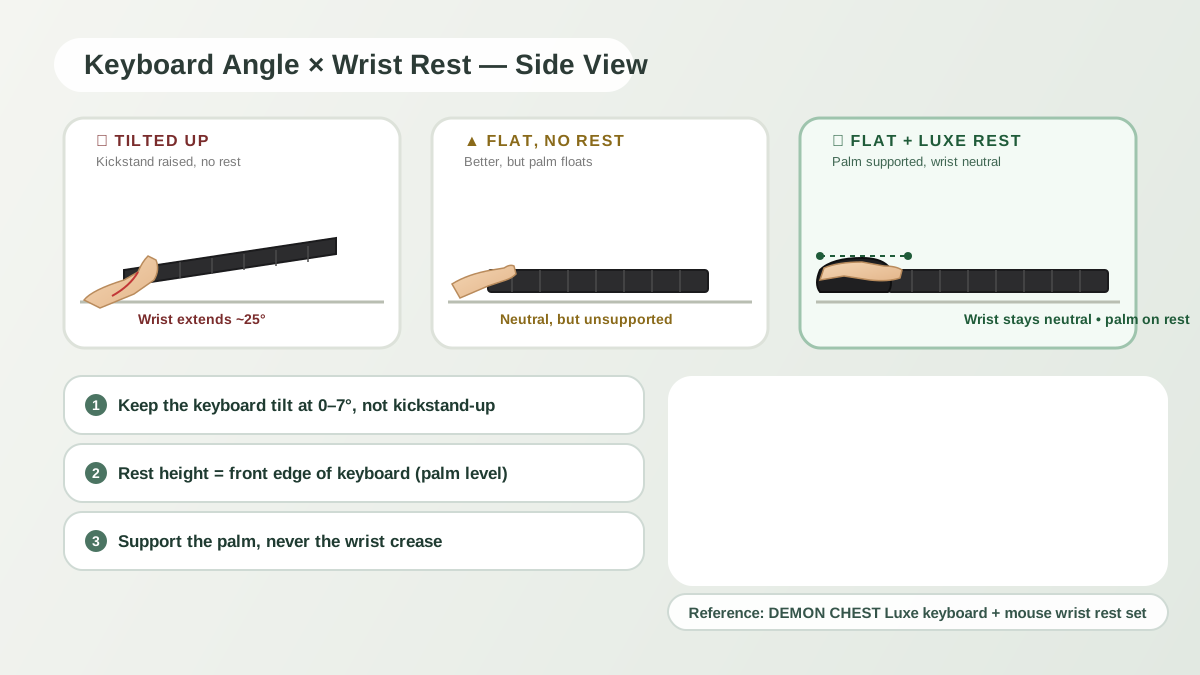
2. Elbows slightly open, around 95–100°. The textbook angle is 90°. The comfortable angle is a little more open. Adjust the chair until your forearms rest roughly parallel to the floor or tilt gently toward the desk. Wrists should never reach upward for the keyboard.
3. Feet flat on the floor. Thighs parallel to the ground, hips at the same height as the knees or slightly above. If your feet dangle, you'll hook them behind the chair legs all day without noticing, which squeezes the calves.
4. Wrist roughly neutral at the mouse. A flat desk pushes the wrist up noticeably, which compresses the carpal tunnel. A gel wrist rest mouse pad drops it back into the safe range. Cheapest ergonomic lever you can pull, and the one most home-office workers skip.
The four play off each other. The chair sets the elbow angle. The desk depth sets the mouse distance. The monitor height sets the neck angle. The mouse pad sets the wrist angle. You can't fix any one of them in isolation.
Four budget tiers (from $0 to a few hundred)
People assume ergonomic setups cost a thousand dollars. They don't. Here's the realistic tiering:
| Tier | Rough budget | What you get | Who it's for |
|---|---|---|---|
| Reposition | $0 | Chair adjusted, monitor on books, mouse closer in | Anyone starting |
| Minimum viable | ~$50 | Add gel mouse pad + laptop stand | Asymptomatic remote workers |
| Comfort | ~$150 | Add external keyboard, wrist rest set, task lamp | 6+ hour desk days |
| Full overhaul | ~$500 | Add a proper chair or sit/stand converter | Existing wrist or back issues |
If you're dealing with any active wrist or back pain, jump straight to Comfort — the $50 setup won't cut it once symptoms are in the picture. If you're fine but sitting 8 hours a day, Comfort has the best long-term return.
Product-level detail for the gel pad and wrist rest inside Comfort and Full lives at best mouse pad for office work and the wrist rest sets collection.
Why the mouse pad is #3 (not #1)
A question I get often: "why rank a $10 mouse pad below a $300 chair?" Because the chair sets your posture, the monitor riser sets your neck angle, and then — and only then — does the mouse pad do its job. A gel wrist rest can't rescue a chair that's four inches too low. You'll still be reaching, and your wrist will still be wrong.
The priority stack, in order:
- Chair (or a footrest to save the one you have). The foundation.
- Monitor riser or laptop stand. The neck is the part that's hardest to retrofit later.
- Ergonomic mouse pad with wrist rest. Highest return per dollar. Drops wrist extension immediately.
- Keyboard wrist rest or full set. Completes the wrist story for both hands.
- External keyboard and mouse (laptop users). Required once the monitor goes up.
- Task lamp. Eye strain is the quiet one; indirect, even lighting helps.
- Cable management. Prevents the "lap crease" that forces hunched reaching.
- Headset stand. Small, but desk clutter is its own ergonomic problem.
Everything past that list is decoration. Useful as office supplies for desk aesthetics, not load-bearing.
Three myths that waste the most money
"A standing desk fixes wrist pain." It doesn't. Standing changes the load on your legs and back. Your wrist and neck geometry stays identical. You still need the gel wrist rest and the monitor at the right height. A standing desk without the other four fixes just lets you stand in the wrong posture.
"I can be ergonomic with just a laptop." Mathematically impossible. If the screen is at eye level, the keyboard is too high for the elbows. If the keyboard is at elbow level, the screen is too low for the neck. Either add an external keyboard and mouse, or accept that you're trading off neck for wrist.
"A gaming chair is ergonomic." Gaming chairs are racing bucket seats with a logo. A lot of them have aggressive side bolsters that narrow the hips and block the shoulder rotation you need for a natural keyboard reach. A real office chair with adjustable lumbar, seat depth, and armrests will beat most gaming chairs at the same price.
Picking by desk depth
Different desks want different accessories. The variable that matters most is how deep your desk is from the monitor to the front edge.
- Narrow desk (≤50 cm): keyboard close, mouse close. A compact gel pad like the Classic Pink or the Classic Black keeps the mouse within elbow pivot range without reaching. A full wrist rest set probably won't fit.
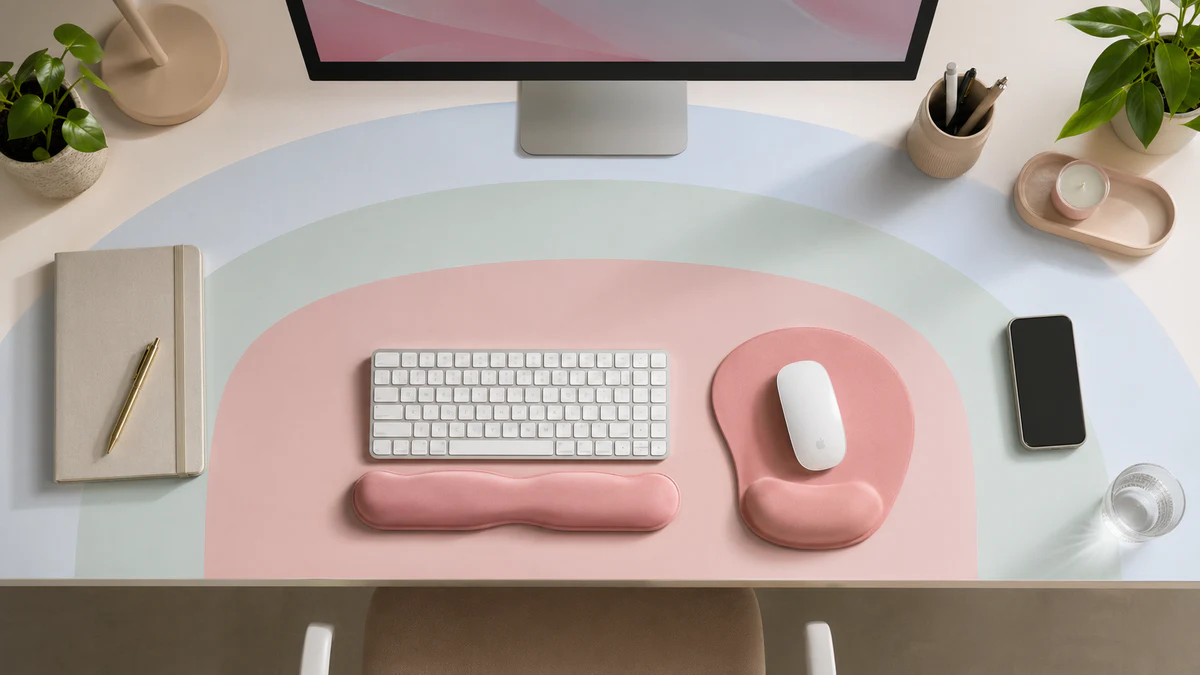
- Standard desk (60–70 cm): the sweet spot. A full ErgoComfort Pink Serenity set fits with room for the keyboard and a water glass.
- Deep desk (80 cm+): you have room to go premium. A Luxe Black or another Luxe pad pairs well with a separate keyboard rest and a monitor riser.
Curated picks by scenario: best mouse pad for office work and best mouse pad for laptop and travel. Side-by-side specs: the series comparison.
FAQ
What's the most important ergonomic office supply to buy first?
If your chair works, grab an ergonomic gel wrist rest mouse pad next — it's the cheapest single upgrade that changes your wrist angle. If your chair is the problem (no lumbar support, fixed height, slowly sinking), fix that first. No amount of desk accessories makes up for a bad chair.
How do desk accessories like a mouse pad affect ergonomics?
A well-chosen mouse pad with wrist support changes three things: wrist angle (closer to neutral), palm pressure (onto cushion instead of a hard edge), and mouse tracking (a non-slip base stops the pad from drifting). Small changes that compound over an 8-hour day.
Is an ergonomic mouse pad worth it if I only work 4 hours a day?
At 4 hours, the long-term RSI risk is lower but not zero. A $10–$15 ergonomic mouse pad is still worth it because the payoff shows up immediately — less wrist bend, less palm pressure — rather than needing years to materialize. The cost-per-hour of comfort makes it one of the best-value office supplies for desk you can buy.
What changed in this update (2026-04-28)
- Added explicit references to ANSI/HFES 100-2007 and the OSHA Computer Workstations eTool as the standards behind the four-measurement framework.
- Reviewer credentials and editorial-fee disclosure made visible at the top of the page.
- Added cross-links to the RSI prevention guide and the 2026 wrist rest buying guide.
References & further reading
- ANSI/HFES 100-2007 — Human Factors Engineering of Computer Workstations. The source of the 95–100° elbow window and neutral-wrist target used above.
- OSHA Computer Workstations eTool — osha.gov/etools/computer-workstations. Free, public, and the closest thing to a U.S. baseline for home-office workers.
- Human Factors and Ergonomics Society — hfes.org. Dr. Ng holds society membership.